
Building the TCP Server — Your First Conversation with a Socket
We know Redis lives in RAM. Now we need to talk to it. A TcpListener, a protocol parser, and the realization that network programming is just the lexer from the language-building arc wearing a different hat.

Before there were APIs, before there were HTTP frameworks, before there were gRPC stubs and GraphQL resolvers, there was a socket. Two programs, a wire between them, and a protocol — an agreement about how to take turns speaking.
The postal system works the same way. You write a letter (the request). You address it (the IP and port). You hand it to a carrier who guarantees delivery and hands you a receipt (TCP's three-way handshake). The recipient reads it, writes a reply, and the carrier brings it back. Neither party knows or cares about the routing — they just trust the protocol.
TCP is registered mail with return receipts. UDP is a postcard with no tracking. Most of the internet runs on registered mail. I've been using this analogy for years and it still holds up — except that nobody has figured out the postal equivalent of a SYN flood attack. Maybe a mailbox full of fake return-address letters?
Today we're building the TCP server that will become the front door of our Redis clone. By the end of this chapter, you'll have a server that accepts connections, reads commands in the RESP protocol, and echoes structured responses back. No key-value store yet — that's for the chapter about data structures. Today is about the conversation itself.
The listener
Every TCP server starts the same way: bind to an address, listen for connections, accept them one at a time.
using System.Net;
using System.Net.Sockets;

var listener = new TcpListener(IPAddress.Loopback, 6379);
listener.Start();
Console.WriteLine("Listening on port 6379...");

while (true)
{
    var client = await listener.AcceptTcpClientAsync();
    _ = HandleClientAsync(client);
}
That last line — _ = HandleClientAsync(client) — is important. We're not awaiting the task. We're launching it and immediately going back to accepting the next connection. This means our server can handle multiple concurrent clients even though this loop is single-threaded. Each client gets its own Task that runs independently.
The _ discard is a deliberate choice. In production you'd want error handling and connection tracking. For now, we're keeping the structure visible.
async Task HandleClientAsync(TcpClient client)
{
    using var stream = client.GetStream();
    var reader = new StreamReader(stream);
    var writer = new StreamWriter(stream) { AutoFlush = true };

    try
    {
        while (client.Connected)
        {
            var command = await ReadCommandAsync(reader);
            if (command == null) break;

            var response = ProcessCommand(command);
            await writer.WriteAsync(response);
        }
    }
    finally
    {
        client.Close();
    }
}
This is the skeleton of every request-response server. Read a command. Process it. Write a response. Repeat until the connection closes. HTTP works this way. SMTP works this way. FTP works this way. The protocol changes; the loop doesn't.
Every network server you've ever used is a variation of the same five lines: listen, accept, read, process, write.
The RESP protocol — a lexer for the wire
Redis doesn't speak HTTP. It speaks RESP — the Redis Serialization Protocol. And if you followed the chapter about building the lexer for our tiny language, RESP will feel immediately familiar.
RESP is a text-based protocol where every message starts with a type byte:
+  → Simple String   "+OK\r\n"
-  → Error           "-ERR unknown command\r\n"
:  → Integer         ":42\r\n"
$  → Bulk String     "$5\r\nHello\r\n"  (length-prefixed)
*  → Array           "*2\r\n$3\r\nGET\r\n$4\r\nname\r\n"
That first byte is the token type. The rest is the value. Reading RESP is scanning — moving through a stream of bytes, recognizing patterns, and producing structured output. It's exactly what our lexer did with source code characters. The input changed from var x = 10; to *2\r\n$3\r\nGET\r\n$4\r\nname\r\n. The algorithm didn't.
When a Redis client sends GET name, it actually sends:
*2\r\n      ← Array of 2 elements
$3\r\n      ← Bulk string, 3 bytes
GET\r\n     ← The command
$4\r\n      ← Bulk string, 4 bytes
name\r\n    ← The key
The *2 says "the next two things are elements of an array." The $3 says "the next 3 bytes are a string." This is length-prefixed encoding — instead of scanning for a delimiter (like our lexer scanning for whitespace), you read the length first and then consume exactly that many bytes. It's faster and unambiguous.
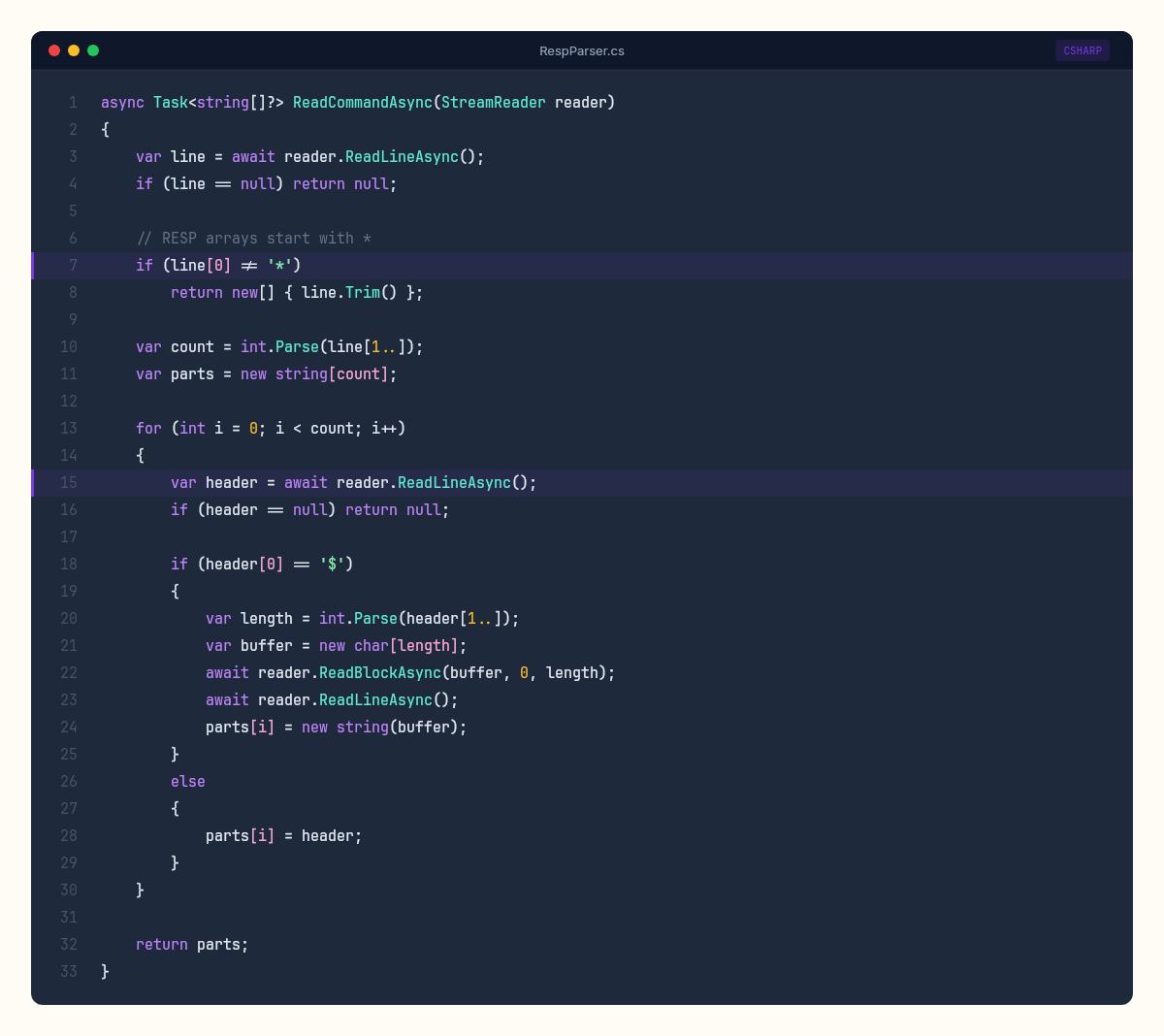
Let's build the parser:
async Task<string[]?> ReadCommandAsync(StreamReader reader)
{
    var line = await reader.ReadLineAsync();
    if (line == null) return null;

    // RESP arrays start with *
    if (line[0] != '*')
        return new[] { line.Trim() };

    var count = int.Parse(line[1..]);
    var parts = new string[count];

    for (int i = 0; i < count; i++)
    {
        var header = await reader.ReadLineAsync();
        if (header == null) return null;

        if (header[0] == '$')
        {
            var length = int.Parse(header[1..]);
            var buffer = new char[length];
            await reader.ReadBlockAsync(buffer, 0, length);
            await reader.ReadLineAsync(); // consume trailing \r\n
            parts[i] = new string(buffer);
        }
        else
        {
            parts[i] = header;
        }
    }

    return parts;
}
Compare this to the lexer's ScanToken() method from the chapter about tokenizing source code. The structure is the same: peek at the first character to determine the type, then branch into type-specific parsing logic. The lexer's switch on '(', '+', '"' is this parser's branch on '*', '$', '+'. Different protocols. Same pattern.
The command dispatcher
Once we've parsed a RESP command into a string array, we need to dispatch it. The first element is always the command name. Everything after is arguments.
For now, our server doesn't have a data store — we'll build that in the chapter about hash tables and expiration. But we can implement the infrastructure and a few diagnostic commands:
string ProcessCommand(string[] command)
{
    var name = command[0].ToUpperInvariant();

    return name switch
    {
        "PING" => "+PONG\r\n",
        "ECHO" => command.Length > 1
            ? $"${command[1].Length}\r\n{command[1]}\r\n"
            : "-ERR wrong number of arguments for 'echo' command\r\n",
        "COMMAND" => "+OK\r\n",
        "INFO" => FormatBulkString("# Server\r\nredis_version:0.1.0-csharp-lab\r\n"),
        _ => $"-ERR unknown command '{command[0]}'\r\n",
    };
}

string FormatBulkString(string value)
{
    return $"${value.Length}\r\n{value}\r\n";
}
This switch expression is a simpler version of the interpreter's Evaluate method from the chapter about building the tree-walking interpreter. In the interpreter, we pattern-matched on AST node types — Binary, Literal, Variable — and executed the appropriate operation. Here, we pattern-match on command names — PING, ECHO, INFO — and produce the appropriate RESP response.
The parallel isn't cosmetic. Both are dispatch tables: a structured input arrives, you inspect its type, you route to the appropriate handler. Compilers, interpreters, protocol servers, HTTP routers — they're all the same machine with different wiring.
Testing with redis-cli
Here's the satisfying part. Real Redis client tools speak RESP. Our server speaks RESP. Which means redis-cli — the official Redis command-line client — can talk to our server without knowing it's not Redis.
Start our server, then in another terminal:
$ redis-cli -p 6379
127.0.0.1:6379> PING
PONG
127.0.0.1:6379> ECHO "hello from C# Lab"
"hello from C# Lab"
127.0.0.1:6379> INFO
# Server
redis_version:0.1.0-csharp-lab
127.0.0.1:6379> GET name
(error) ERR unknown command 'GET'
PING works. ECHO works. INFO returns our version string. GET fails because we haven't built the data store yet — exactly the behavior we'd expect.
There's something deeply satisfying about this moment. I remember the first time I connected a real Redis client to a server I'd built from scratch. The terminal printed PONG and I actually said "yes" out loud. To nobody. In an empty room. A real Redis tool, built by the Redis maintainers, connects to a server we wrote from scratch in C# and holds a conversation. The protocol is the shared language. As long as both sides speak RESP correctly, the implementation language is irrelevant.
What the postal metaphor hides
The postal system analogy is useful for understanding TCP's basic guarantees — ordered delivery, reliability, acknowledgment. But it hides the crucial difference: speed.
A letter takes days. A TCP packet takes microseconds. And that speed difference changes what's possible.
In a postal system, you'd never send one letter per question. You'd batch — "Dear supplier, please send items A, B, and C." The round-trip cost is too high for one item at a time.
TCP clients face the same trade-off. Each command to our server requires a round-trip: send the command, wait for the response. On a local machine, that's maybe 50-100 microseconds. Over a network, it's 0.5-2 milliseconds. If you need to execute 1,000 commands, that's 1,000 round-trips — potentially 2 full seconds of waiting.
Redis solves this with pipelining: send all 1,000 commands at once, without waiting for individual responses, then read all 1,000 responses in a batch. Our current server already supports this accidentally — because each HandleClientAsync reads and writes in a loop, a client that sends multiple commands quickly will get multiple responses quickly. But real pipelining requires the client to stop waiting for each response before sending the next command.
// Without pipelining: 1,000 round-trips
for (int i = 0; i < 1000; i++)
{
    await SendCommandAsync(stream, $"SET key:{i} value:{i}");
    var response = await ReadResponseAsync(stream);  // blocks here
}

// With pipelining: 1 round-trip batch
for (int i = 0; i < 1000; i++)
{
    await SendCommandAsync(stream, $"SET key:{i} value:{i}");
    // don't wait — keep sending
}
// Now read all 1,000 responses
for (int i = 0; i < 1000; i++)
{
    var response = await ReadResponseAsync(stream);
}
The difference is dramatic. Pipelining can improve throughput by 5-10x for batch operations. It's the network programming equivalent of buying stamps in bulk instead of walking to the post office for each letter.
The gaps in our server
Our server has a problem that will become obvious under load: we're creating a new Task for every connection, and each task uses StreamReader/StreamWriter which allocate buffers. With 10 clients, this is fine. With 10,000 clients, we'll be churning through memory allocations that the garbage collector has to clean up.
Real Redis uses epoll (Linux) or kqueue (macOS) — kernel-level event notification that lets a single thread monitor thousands of connections without allocating a thread or task per connection. In .NET, the closest equivalent is System.IO.Pipelines — a zero-copy, buffer-pooling I/O abstraction built for exactly this scenario.
We're not going to use Pipelines yet. Our StreamReader approach is clear, correct, and fast enough for learning. But the gap matters: it's the difference between a server that handles hundreds of connections and one that handles hundreds of thousands. The chapter about Channels and concurrent dispatch will address the concurrency model. For now, the conversation works.
There's also no timeout handling. A client that connects and never sends anything will hold a Task open forever. The first TCP server I ever wrote had no timeout handling either. A misbehaving client held a connection open for three days before anyone noticed. The fix took ten minutes. Finding it took three days of watching connection counts climb. No authentication. No maximum command size. No protection against a client sending a $999999999 bulk string length and exhausting our memory.
Every one of these is a production concern. Every one of them is a chapter waiting to be written in a different week. For now, our server does exactly what we need: it listens, it parses RESP, it dispatches commands, and it responds. The conversation is open.
The wire underneath
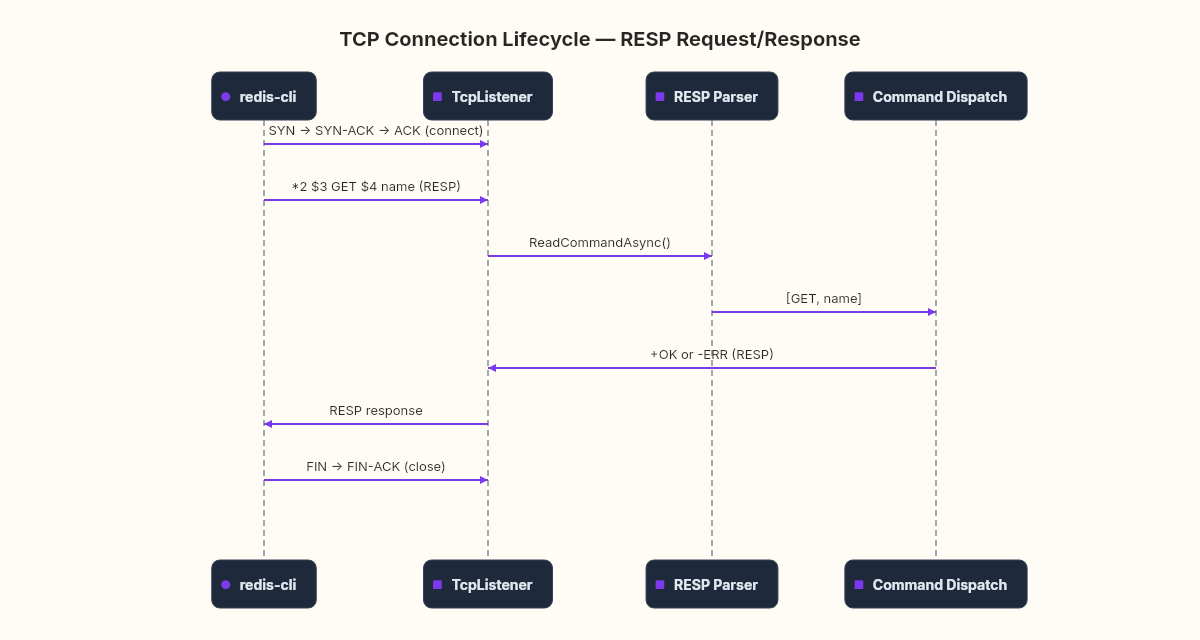
If you open Wireshark while redis-cli talks to our server, you'll see something that makes the postal metaphor concrete. Each RESP command is a TCP segment. Each response is a TCP segment back. Between them, ACK packets — the return receipts confirming delivery.
The SYN → SYN-ACK → ACK handshake at the start of the connection is the postal registration: both parties agreeing on sequence numbers (the tracking numbers for their letters). The FIN → FIN-ACK at the end is the formal close — "I have no more letters to send."
Building a server from TcpListener makes this visible in a way that HTTP frameworks hide. When you call app.MapGet("/api/users", ...) in ASP.NET, you're standing on top of Kestrel, which stands on top of System.Net.Sockets, which stands on top of the OS kernel's TCP stack. Each layer adds capability and hides complexity. Today we stood at the socket layer and saw the conversation directly.
The data structures come next — when this conversation starts carrying real data, we'll need somewhere to put it.