
The Outbox Toolbox — MassTransit, NServiceBus, Wolverine, and CAP Compared
Four libraries implement the same pattern. Their APIs reveal four different philosophies about how distributed systems should be built.

"So which one do we use?"
The question came up in the third week of a project at a regulated financial services platform. We'd agreed on the outbox pattern — the decision matrix from yesterday's chapter had made the case. But now three engineers were staring at a whiteboard with four library names written on it, and nobody wanted to pick first.
I've been in that exact meeting four times across different teams. The conversation always follows the same arc: someone advocates for the one they've used before, someone Googles "MassTransit vs NServiceBus," someone finds a three-year-old Reddit thread that's confidently wrong, and eventually the tech lead picks whatever has the most GitHub stars.
There's a better way. Today we put all four on the table, side by side. Same pattern, four different philosophies.
The four contenders
A sommelier doesn't rank wines. She pairs them. A bold Barolo with braised short ribs. A crisp Vermentino with grilled branzino. The wine isn't better or worse — the pairing is right or wrong.
Outbox libraries work the same way. Each one has a terroir — the soil it grew in, the conditions that shaped its design:
MassTransit: the community vineyard. Open-source, broadly adopted, integrates with everything
NServiceBus: the grand cru. Commercial, enterprise-grade, the most mature messaging framework in .NET
Wolverine: the natural wine. Opinionated, modern, designed for developer ergonomics
CAP (DotNetCore.CAP): the house wine. Lightweight, practical, gets the job done without ceremony
Let's taste each one.
MassTransit — the 80% solution
MassTransit is the library most .NET teams reach for first. Open-source, well-documented, supports RabbitMQ, Azure Service Bus, Amazon SQS, and Kafka. Its outbox implementation ships as MassTransit.EntityFrameworkCore.
// Registration
services.AddMassTransit(x =>
{
    x.AddEntityFrameworkOutbox<AppDbContext>(o =>
    {
        o.UseSqlServer();        // or UsePostgres()
        o.UseBusOutbox();        // routes all publishes through outbox
        o.QueryDelay = TimeSpan.FromSeconds(1);
        o.DuplicateDetectionWindow = TimeSpan.FromMinutes(30);
    });

    x.UsingRabbitMq((context, cfg) =>
    {
        cfg.ConfigureEndpoints(context);
    });
});
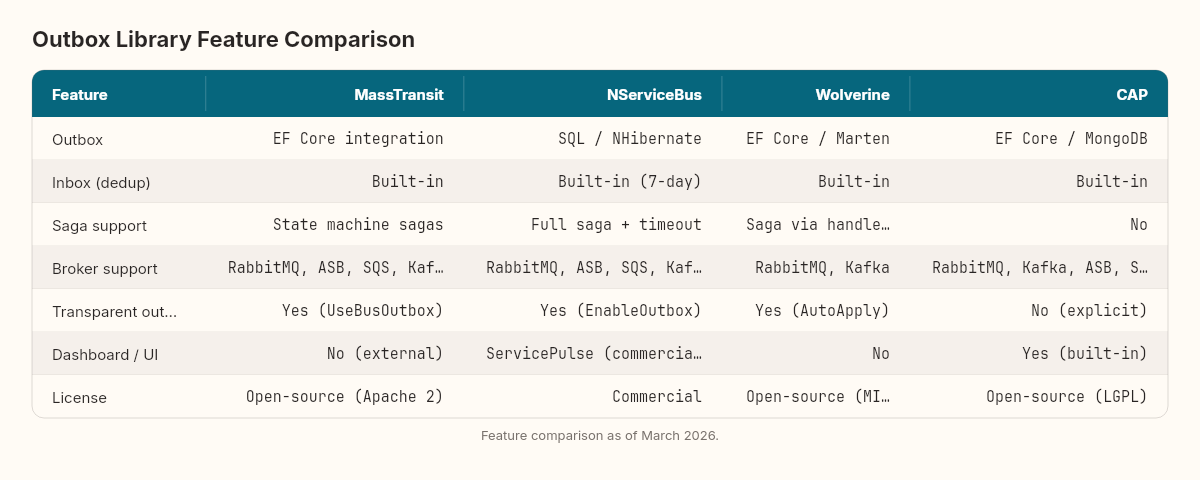
The outbox stores messages in your EF Core DbContext transaction. A background DeliveryService polls the outbox table and forwards messages to the broker. Deduplication is built in — it tracks message IDs for a configurable window.
What I like: the UseBusOutbox() call is a single line that routes all publishes through the outbox. You don't need to change your consumer code. The outbox is transparent.
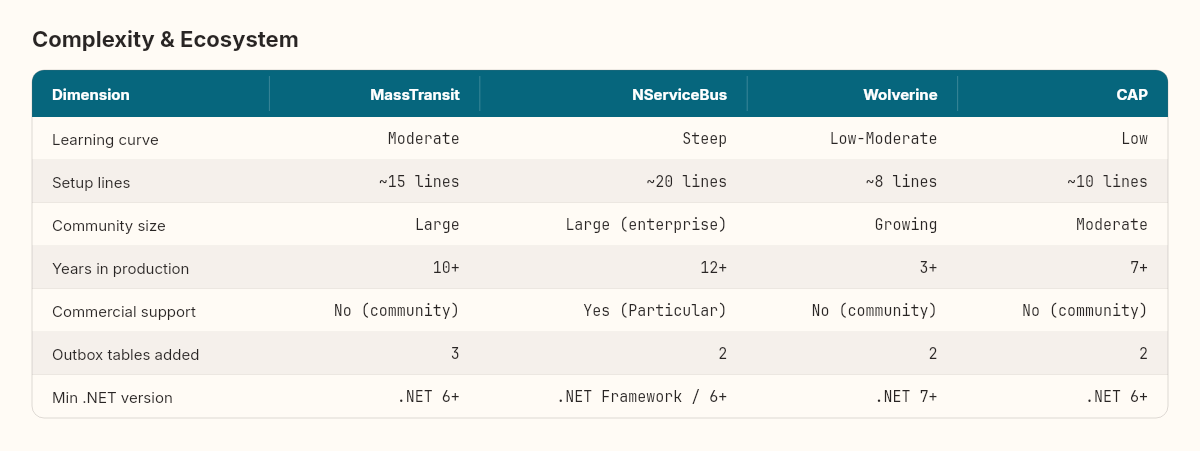
What to watch: MassTransit's outbox requires its own InboxState, OutboxState, and OutboxMessage tables in your database. If you're particular about schema ownership, that's three extra tables you didn't ask for. The polling interval (QueryDelay) is a tunable trade-off between latency and database load — we explored this tension in Thursday's stress test.
// Publishing — identical whether outbox is enabled or not
public class OrderCreatedHandler : IConsumer<OrderCreated>
{
    public async Task Consume(ConsumeContext<OrderCreated> ctx)
    {
        // This publish goes through the outbox automatically
        await ctx.Publish(new OrderConfirmed
        {
            OrderId = ctx.Message.OrderId
        });
    }
}
NServiceBus — the enterprise safety net
NServiceBus is commercial software. It has a license cost. And for some teams, that license is the best money they'll spend.
Its outbox has been in production since 2014 — longer than most .NET developers have been thinking about the pattern. The implementation is battle-hardened across banking, healthcare, and logistics systems.
// Registration
var endpointConfig = new EndpointConfiguration("Orders");

var outbox = endpointConfig.EnableOutbox();
outbox.KeepDeduplicationDataFor(TimeSpan.FromDays(7));
outbox.RunDeduplicationDataCleanupEvery(TimeSpan.FromMinutes(15));

var persistence = endpointConfig.UsePersistence<SqlPersistence>();
persistence.ConnectionBuilder(() =>
    new SqlConnection(connectionString));
NServiceBus doesn't just do outbox — it does outbox and inbox. Every incoming message is deduplicated at the endpoint level. The KeepDeduplicationDataFor setting means it remembers which messages it has already processed for up to seven days. Combined with the outbox, you get exactly-once processing semantics that survive broker restarts, database failovers, and deployment rollbacks.
What I like: the saga support is unmatched. If you need long-running business processes with compensating actions — order fulfillment, payment processing, multi-step approval workflows — NServiceBus sagas integrate with the outbox natively. Every saga state change and every message it sends participate in the same transaction.
What to watch: the learning curve is real. NServiceBus has its own vocabulary: endpoints, handlers, sagas, behaviors, pipelines. A team at a logistics platform I worked with chose NServiceBus for the outbox, then spent two months learning the framework before they could ship. By contrast, a team that only needs the outbox and nothing else is paying for a Formula 1 car to drive to the grocery store.
Wolverine — the modern take
Wolverine (from the JasperFx family) is the newest of the four. It's opinionated, convention-based, and designed for developers who find MassTransit's configuration verbose.
// Registration — minimal
builder.Host.UseWolverine(opts =>
{
    opts.UseEntityFrameworkCoreTransactions();
    opts.Policies.AutoApplyTransactions();

    opts.UseRabbitMq();
    opts.PublishAllMessages().ToRabbitMqExchange("events");
});
Wolverine's outbox is transactional middleware, not a separate component. When you enable AutoApplyTransactions, every message handler automatically wraps its work in a transaction that includes both your EF Core changes and any outgoing messages. There's no separate outbox table — Wolverine uses the wolverine_* tables in your persistence store.
// Handler — no attributes, no interfaces, just a method
public static class OrderHandler
{
    // Wolverine discovers this by convention
    public static OrderConfirmed Handle(OrderCreated message,
        AppDbContext db)
    {
        // Return value = outgoing message, automatically
        // enrolled in the same transaction as db changes
        return new OrderConfirmed { OrderId = message.OrderId };
    }
}
The return value is the outgoing message. No IPublisher, no ConsumeContext, no await Publish(). Just return what you want to send.
What I like: the handler code is the cleanest of any framework. Pure functions that take a message and return a response. Wolverine handles the plumbing — transactions, retries, outbox enrollment — through its middleware pipeline.
What to watch: Wolverine is younger. The community is smaller. Documentation, while improving, has gaps. And the convention-based discovery — while elegant — can be disorienting for teams used to explicit registration. I've seen two teams try Wolverine and love it, and one team abandon it after a week because they couldn't figure out why a handler wasn't being invoked (it was a method visibility issue).
CAP — the practical choice
DotNetCore.CAP is the library that does one thing well. It provides an outbox with built-in support for RabbitMQ, Kafka, Azure Service Bus, Amazon SQS, NATS, and Pulsar — more broker options than any other library on this list.
// Registration
services.AddCap(x =>
{
    x.UseEntityFramework<AppDbContext>();
    x.UseRabbitMQ("localhost");

    x.UseDashboard();  // built-in monitoring UI
    x.FailedRetryCount = 5;
    x.SucceedMessageExpiredAfter = 3600;
});
CAP uses a publish/subscribe model with ICapPublisher. Messages are stored in a cap.Published table within your database transaction and delivered asynchronously.
public class OrderService
{
    private readonly AppDbContext _db;
    private readonly ICapPublisher _publisher;

    public async Task CreateOrder(Order order)
    {
        using var tx = _db.Database.BeginTransaction(
            _publisher, autoCommit: false);

        _db.Orders.Add(order);
        await _db.SaveChangesAsync();

        await _publisher.PublishAsync("order.created",
            new OrderCreated { OrderId = order.Id });

        await tx.CommitAsync();
    }
}
What I like: the built-in dashboard. Out of the box, CAP gives you a web UI to monitor published messages, failed deliveries, and retry status. No Seq, no Grafana — just x.UseDashboard() and navigate to /cap. For small teams without a dedicated observability stack, this is surprisingly valuable.
What to watch: CAP is primarily maintained by a single developer (Yang Xiaodong). The project is well-maintained and widely used in the Chinese .NET community, but if your organization requires commercial support or SLA guarantees, this matters. The API is also lower-level — you manage the transaction explicitly, unlike MassTransit's transparent outbox or Wolverine's automatic enrollment.
The comparison
Here's what the sommelier's tasting notes look like side by side:
And the dimension that rarely appears in blog posts — what you'll actually pay in complexity and learning time:
Which one pairs with your system?
After implementing outbox patterns with three of these four libraries in production, here's my pairing guide:
Choose CAP when you're a small team building a greenfield system, you want outbox without buying into a full messaging framework, and you value broker flexibility. CAP lets you swap RabbitMQ for Kafka later without rewriting your publishers.
Choose MassTransit when you need a complete messaging framework — consumers, sagas, scheduling, retries — and the outbox is one feature among many. This is the 80% case. Most teams I've worked with end up here, and most are happy.
Choose NServiceBus when you're in a regulated industry, you need commercial support, or your system has complex long-running business processes that require saga orchestration with guaranteed exactly-once semantics. The license cost buys you peace of mind and a support team that has seen your problem before.
Choose Wolverine when your team values developer ergonomics, you're comfortable with convention-based frameworks, and you want the most modern API surface. Wolverine is a bet on the future — less battle-tested but architecturally cleaner.
The wrong question
The team at the financial services company — the ones staring at the whiteboard — eventually chose MassTransit. Not because it was the best library. Because two of the three engineers had used it before, and the project's timeline couldn't absorb a learning curve.
That's the real decision framework. The technical differences between these libraries matter less than the gap between your team's current knowledge and the library's expectations. A team that knows NServiceBus will be faster with NServiceBus than with a "simpler" library they've never touched.
The right question isn't "which library is best?" It's the same question a sommelier asks: "What are we pairing it with?"
Tomorrow, we close out Week 1 by stepping back to look at the thread connecting all six chapters. The outbox pattern was the entry point, but the real subject has been something bigger — the cost of guarantees in distributed systems, and what it means to choose which guarantees you're willing to pay for.